WarriorPlus Deal of the Day — “I made a whole month of promo videos for my coloring books in under an hour without showing my face”
🏆 WarriorPlus Deal of the Day“A whole month of promo videos in under an hour — without showing my face.”
For KDP coloring-book publishers

You put real work into that book — the pages, the cover, the upload. And right now, almost no one has ever seen it.

Your books don't have a quality problem.
They have a motion problem.

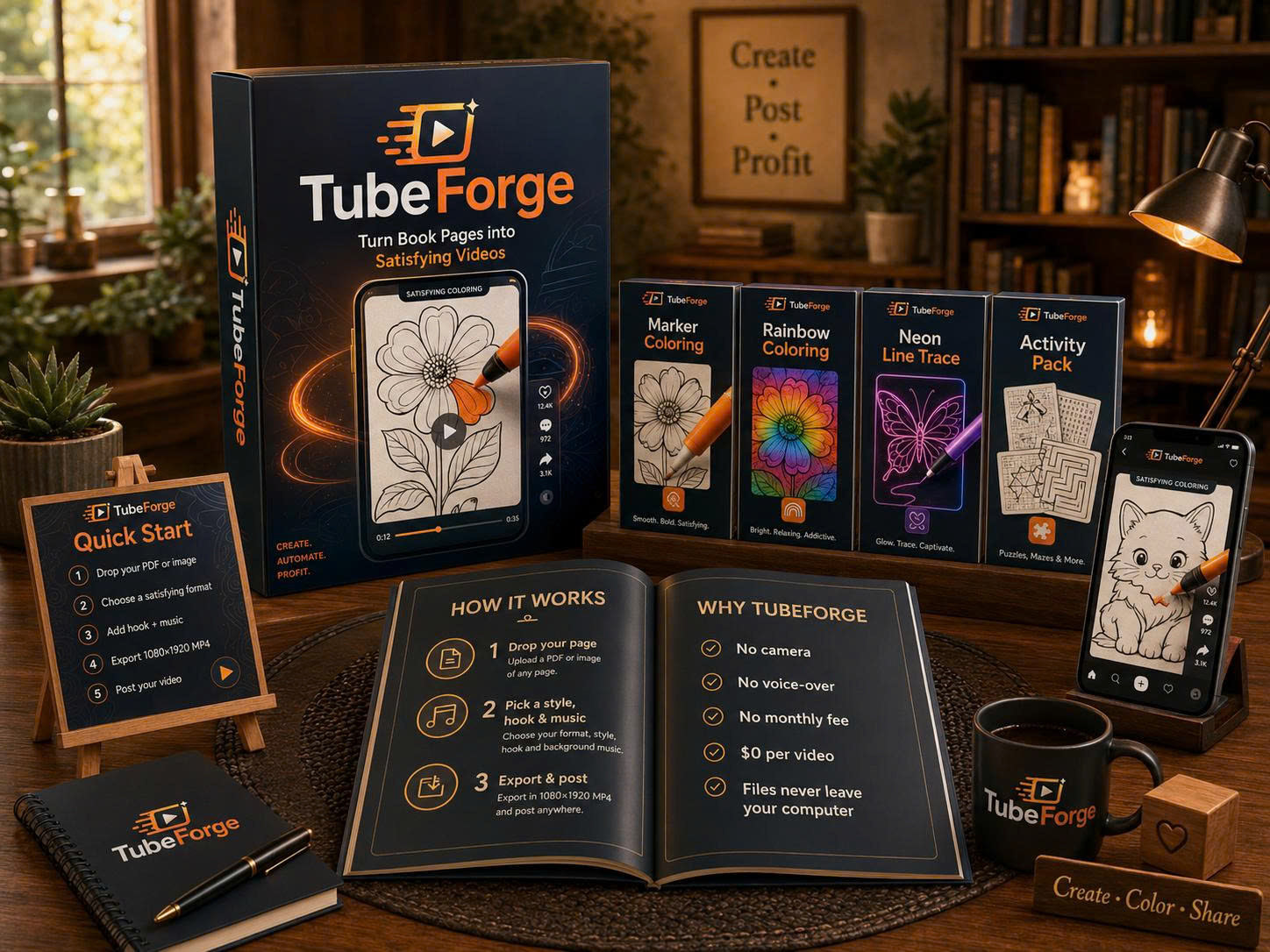
Amazon buries coloring books where almost no one scrolls. Meanwhile every free channel left — Shorts, Reels, TikTok, Pinterest — rewards one thing: volume of movement. TubeForge turns each page of a book you already made into a satisfying video people watch to the last stroke — so one book becomes a month of daily posts. Right in your browser. No camera. No voice. No AI redrawing your art. And every single video costs $0.

TubeForge — turn book pages into satisfying videos
Get TubeForge — $17one-time · instant access One payment. No subscription, no monthly fee — ever. $0 for every video after that.
VISAMASTERCARDAMEXDISCOVERPAYPAL
No cameraNo voice-overNo monthly fee$0 per videoFiles never leave your PC
A note on why this exists

If you publish coloring books, you already know the quiet part: the hard work is finished, the book is live — and then nothing happens. No views. No sales. Not even a review to prove a human ever opened it. It's tempting to blame the book. Usually the book is fine.

Here's what's actually going on. Every free channel left — Shorts, Reels, TikTok, Pinterest — hands out reach for exactly one thing: motion. And a page on a shelf can't move. So the best books in the world sit invisible, while the only advice on offer is "spend more on ads" or "build an audience first" — the two things a busy publisher has neither the budget nor the time for.

Meanwhile, one format quietly racks up billions of views: the oddly-satisfying process video — a marker filling a page, colour spreading across the art. People watch those to the very last stroke. The gap was obvious: your books are already that kind of art. They just weren't moving.

So TubeForge was built to close that one gap, and nothing else. It won't post for you, it won't promise you views, and it will never redraw a single line of your art. It takes a page you already made and turns it into a video people watch to the finish — for $0, right in your browser, in about a minute.

That's the whole promise. Not riches, not a shortcut — just a fair shot at being seen. If that's the honest kind of help you were looking for, you're in the right place.

Thu Thao — maker of TubeForgeThu ThaoMaker of TubeForge

A great book that no one ever sees isn't a marketing problem.
It's a motion problem — and motion is the one thing you can fix today.

The real reason

Why good books sit at zero sales

You did the hard part. You designed the pages, built the cover, hit publish. And then it just… sits there. No views. No sales. Not even a single review to prove anyone looked.

It's tempting to blame the book. Usually that's not it. The real reason is quieter — and it's not your fault.

The problem The Static Shelf

Amazon's search rarely surfaces coloring books — so there's no organic discovery loop feeding you new eyes. Your book becomes a static object on a shelf nobody walks past. Ads make you bid against everyone and break even at best. And "just post on social" runs into a wall every seller hits: you need an audience first — and no one tells you how to build one.

So the books pile up, the ad spend leaks out, and the platforms that actually hand out free reach keep rewarding the one thing a page on a shelf can't do: move.

The fork in the road

Two ways to get a book seen

The old way

  • Bid on Amazon ads against everyone — break even if you're lucky
  • Pay a freelancer $25–$75 for one book trailer that lives nowhere
  • Wrestle Canva or CapCut for an afternoon per clip
  • Get told to "build a following first"
  • Post and pray

The TubeForge way

  • Turn a page you already own into a video in about a minute
  • Make dozens from one book — a month of posts in a sitting
  • Post the satisfying format Shorts, Reels, TikTok & Pinterest reward
  • $0 per video to make. No subscription, no per-render fee.
  • Everything renders on your machine — files never uploaded
Introducing TubeForge

Give people a reason to stop scrolling

Watch anyone with a coloring video: they don't scroll away. A half-colored page is an open loop — the brain needs to see it finished. That's the entire reason "oddly satisfying" is one of the most-watched genres on earth.

The mechanism The Finish-Line Loop

TubeForge turns every page into that open loop. A marker fills the art stroke by stroke, a rainbow sweeps across it, a neon line glows to life, the finished picture snaps together piece by piece — with soft, satisfying sound — until it's done. Viewers stay for the finish. That held attention is exactly what the algorithms measure.

tubeforge.novaaiplatform.com/create

What that means you can do the first night you log in

  • The 3-second trick that stops a stranger's thumb — built into every video automatically, nothing to set up.
  • Why a half-finished page out-pulls a perfectly finished one — and how the app turns that into watch-time.
  • How to squeeze a week of daily posts out of one book — with no filming, no voice-over, and no editing app.
  • The one kind of "motion" every free platform quietly rewards — and how to hand it to them at $0 a video.
  • How to keep 100% of your videos "original content" — so you're never flagged for reused or AI-mangled clips.
Why these videos get watched

Three things a page needs before anyone stops scrolling

Most "book promo" videos have none of them. Every video TubeForge makes has all three — automatically.

1 First

An open loop

A half-finished page the brain can't leave alone. The marker starts colouring, half the picture is still blank — and the viewer has to see it done. That single unfinished detail is what buys you the first three seconds.

2 Second

Motion the feed rewards

Every algorithm measures one thing above all: did people keep watching? Stroke-by-stroke progress plus a subtle camera move keeps the frame alive — so the platform keeps handing you free reach instead of burying you.

3 Third

A reason it's yours

Because the video is built from your own linework — not AI redraws, not stock clips — it's original content, not the "reused" material that gets faceless channels demonetized. It's unmistakably your book.

How it works

Three steps to your first video

If you can drag a file, you can do this. The app does the rest.

1

Drop your page

A whole PDF (it auto-splits every page) or images. It renders on your computer — your files never leave your PC.

2

Pick a style, hook & music

Choose a satisfying format, a viral top-text hook, a camera move and a mood. One click each.

3

Export & post

Download a 1080×1920 HD MP4, upload it, and put your book link in the bio. Repeat with the next page.

What's inside

Everything in the front-end app

🖍️

Satisfying process templates

Marker Coloring, Rainbow & Neon Line-Trace — the formats people watch to the end. (2 more in the Activity Pack upgrade.)

🎥

4 camera moves

Follow, wide, slow push-in & snap — the subtle handheld motion that stops thumbs.

52 viral hooks, 13 niches

Never stare at a blank caption. Pick a proven top-text hook and go.

Pattern-interrupt opener

Optionally flash the finished art first — then rewind and colour it. Built to stop the scroll in the first second.

🎵

Copyright-free music + ASMR sound

4 moods and the satisfying marker sound baked in. Nothing to clear, nothing to strike you.

📄

One book → a month of content

Drop the whole PDF and turn every page into its own short. Your catalog becomes a content library.

🎬

HD MP4, no watermark

Clean 1080×1920 H.264 that uploads everywhere. WebM fallback on older browsers.

🔒

100% in your browser

Nothing to install. Your artwork is never uploaded to a server — it never leaves your computer.

What comes out the other side

Vertical shorts made from real book pages — the satisfying format Shorts, Reels, TikTok & Pinterest reward.

3 formats included with TubeForge · 2 more in the Activity Pack upgrade. Tap any tile to watch full-screen.

This is not an "AI video generator"

The whole market is drowning in AI tools that "redraw" your art — and mangle it. Wrong lines, melted details, a picture that isn't your book anymore.

TubeForge never touches your linework. It animates the real page — every stroke exactly where you drew it. What you upload is what viewers see, coloured in. Nothing invented, nothing altered.

That matters for a second reason: because the video is built from your own original artwork, it's genuinely your content — not the "reused content" that gets faceless channels demonetized.

The real math

One $17 payment vs. the alternatives

The real competition isn't another app — it's what you're already spending to get seen. And the channels don't reward the best video; they reward whoever posts the most. So the number that decides your reach is volume — and here, volume is free.

OptionWhat it costsPer video
Amazon / Facebook adsHundreds a month, bidding against everyone
Freelance video on Fiverr$25–$75 each$25–$75
Editor apps (CapCut / Canva Pro)~$8–$13 / month, forever — best parts behind "Pro"your time
TubeForge$17 once — no subscription$0

Do the volume math: a single 30-page book becomes 30+ videos — a month of daily posts across four platforms — and every one of them costs $0. Every other option makes posting more cost you more. This one makes it free.

The honest filter

Is TubeForge right for you?

✅ It's for you if…

  • You already have coloring books — line art with closed outlines and white areas to fill
  • You want free traffic instead of more ad spend
  • You won't show your face or use your voice — and don't want to
  • You'd rather make 30 videos in an hour than one in an afternoon

🚫 It's NOT for you if…

  • Your books are journals, planners or pages of text — there's nothing enclosed to colour in, so the coloring templates do nothing with them
  • Your books are mazes — the whole path is one connected area, so it floods in a single sweep instead of colouring in
  • You want a "get rich" button — this is a tool, not a lottery ticket
  • You expect it to auto-post or manage your accounts (it doesn't — you post)
  • You're hoping it fixes a book people genuinely don't want
  • You want us to promise views or income — we won't, and no honest tool can
Why only $17?

Two honest reasons. First, we'd rather have people actually using it and posting what they make than chase a high sticker price. Second, it's priced to be a no-brainer next to what you're already spending to get seen — a single freelance video costs more than this entire app. It is a one-time payment — not a subscription, not a credit you top up.

Get started today
Here's the real cost of waiting: every day those books sit still is another day the free reach — the views, the readers, the sales — goes to someone who did post a video. $17 once is less than a single freelance clip. The sooner it's yours, the sooner your pages start moving.

Here's everything you get — one payment, yours to keep:

  • The full TubeForge app (runs in your browser)
  • 3 satisfying process templates + 4 camera moves
  • 52 viral hooks, copyright-free music & ASMR sound
  • Whole-PDF import — every page becomes its own short
  • HD 1080×1920 MP4 export, no watermark
  • 50 video renders — one page = one video (a 25-page book uses 25). A one-time allowance, not monthly; it doesn't refill
  • Every future update to the front-end app — free
$17

one-time · instant access · no monthly fee

Get TubeForge — $17one-time · yours to keep

Click the button → your account is created the moment you pay → you're making your first video in the next 10 minutes.

One freelance video runs $25–$75. An editor subscription is a bill every month, forever. TubeForge is $17 once — and it makes 50.

30-day money-back guarantee. Buy it, make some videos from your own pages, and if it isn't right for you say the word within 30 days and you get every cent back. Everything the app does — and doesn't do — is still spelled out on this page and in the demo, because I'd rather you chose correctly than refunded later.

Already bought?

Before you decide

Questions, answered straight

Do I need to install anything?

No. TubeForge runs entirely in your web browser. Nothing to download, nothing to set up.

Do I need design or video-editing skills?

No. You drag in a page and pick a few options. The app does the animating, timing, sound and export for you.

Do I have to be on camera or record my voice?

Never. There's no filming and no voice-over anywhere in the process. It's built for faceless content.

Is this AI that changes my artwork?

No. Your lines stay exactly as you drew them. TubeForge animates the real page — it never redraws or "reimagines" your art.

Will these count as "reused content" and get me demonetized?

The video is generated from your own original artwork, so it's your content — not third-party clips or stock footage. (We can't speak for any platform's private review, but nothing here is borrowed material.)

Will it work on my word searches, mazes or journals?

Straight answer, because this is where it either fits or it doesn't. The coloring templates fill enclosed white areas, so:

Coloring pages — what it's built for. Clean closed outlines, large white interiors.
Word searches and crosswords — these work well. Every cell is its own enclosed area, so the grid fills in square by square. A 15×15 word search gave 243 separate areas, more detail than most coloring pages. (Cap the length in the app — that one ran 62 seconds.)
⚠️ Mazes — no. The entire path is one connected area, so it floods in a single sweep. Use Neon Line Trace or Jigsaw Reveal instead.
⚠️ Journals, planners, pages of text — the coloring templates do nothing at all; a page of text has no enclosed white to fill. Neon Line Trace and Jigsaw Reveal still work on them, but they trace and reveal rather than colour.
⚠️ Shaded illustrations and engravings — dense hatching leaves no white inside the subject, so the subject stays black and white.

Rule of thumb: if a child could colour it in with crayons, the coloring templates can colour it. If you're unsure about your particular pages, email one before you buy and we'll run it and send you the video.

What about pages with characters or people in them?

Honest answer: the automatic colours don't know a face from a cloud, so on a character page a face can come out green — which looks wrong in a way a green flower doesn't. Two tools exist for exactly this. The Warm & skin palette keeps the whole page in skin, sand and honey tones, so nothing can land on a "wrong" colour. And 🎯 Pin colours lets you click the face, the hands, the hair and give each the exact colour they should have — then hit 🎲 and everything else reshuffles around your choices while they stay put.

Where does the music come from? Is it really copyright-free?

It isn't licensed from anywhere — TubeForge writes it as it renders. The app plays chord progressions and melodies built into the code through your browser's own sound engine, at the moment you press Render. There is no audio file anywhere in the product and nothing is fetched from a music service, so there's no rights holder, nothing to credit, and no licence terms to read. The marker ASMR sound is made the same way — filtered noise, not a recording. (You can upload your own track instead if you'd rather; the rights to that one are yours to manage.)

Is it a one-time payment or a subscription?

One-time. You pay once on this page — no subscription and no monthly fee, and nothing recurring is ever charged to you.

To be completely clear about what that buys, because it matters: the front-end includes 50 video renders. They're yours to use at whatever pace you like, with no deadline — but they are a one-time allowance and they don't refill. If you use all 50 and want to keep going, the Unlimited upgrade removes the cap for a single $47 payment. There is no other way to top up, and I'd rather you knew that now than after you'd paid.

How many videos can I make?

50 renders on the front-end plan. One page = one video, so a 25-page book uses 25 of them. It's a one-time allowance — it does not reset each month. There's no deadline on using them, but once they're gone the only way to carry on is the Unlimited upgrade ($47, one-time), which removes the cap entirely. Decide with that in mind: if you publish two 25-page books, 50 is exactly what that costs.

I dropped in a 30-page PDF — do I get one long video?

No, and that's on purpose: one long clip is unpostable as a Short. You get one video per page. Press Render, the page downloads, and the app moves you to the next one for another click — so a 30-page book is 30 clicks and 30 renders. If you'd rather queue the whole book and walk away while it saves every page for you, that's what the Bulk Studio upgrade does.

What do I upload — and does it leave my computer?

A PDF (it auto-splits into pages) or images (PNG/JPG). Everything renders on your machine; your files are never uploaded to a server.

Mac or PC? Which browser?

Either — it's a desktop web app, so Mac, Windows and Linux all work. Use Chrome or Edge if you can: they're the browsers that can produce an MP4. Firefox and Safari run TubeForge fine, but they can't encode H.264, so your videos come out as WebM instead — which uploads perfectly well to Shorts, Reels, TikTok and Pinterest, but isn't as friendly if you want to edit the file afterwards.

What's your refund policy?

30 days, no questions asked. If TubeForge isn't right for you, email me within 30 days of buying and I'll refund you in full — you don't have to justify it and I won't ask you to prove you tried. That covers the app and every upgrade.

The guarantee isn't a substitute for telling you the truth up front, though. This page still says plainly which page types work and which don't, because a refund costs us both time and I'd rather you bought the right thing. If you're unsure whether your pages suit it, email one over before you buy and I'll run it for you.

How do I get help?

Email thuthao07082002@gmail.com any time.

Your book isn't the problem. It just needs to move.

P.S. — $17 is a one-time payment: no subscription and no per-video fee on your 50 renders, no "Pro" paywall on the core app. Pay once and it's yours — every future update to the front-end app included. And every day you put it off, your books stay exactly where they are: unseen. The next video you post could be the one that finally moves.
P.P.S. — I'm not going to promise you'll go viral or get rich; you've heard that too many times to believe it, and honestly no tool can promise it. What I can promise is this: TubeForge turns the books you already made into satisfying videos, in your browser, at $0 each — so for the first time your pages can actually be seen. The rest is the work. But at least now the work has a chance.

Earnings & results disclaimer. TubeForge is a software tool for making videos. We do not guarantee that you will earn money, get views, generate traffic, sell books, or achieve any particular result. Outcomes depend on your own effort, your books, your market and audience, each platform's rules, and other factors outside our control. Any examples, demos or figures shown are illustrative only and are not a promise of performance or income. Full disclaimer.

Refund policy: 30-day money-back guarantee. If you're not satisfied, contact us within 30 days of your purchase and we'll refund it in full — the front-end app and any upgrade. No conditions and no explanation required. Refunds are processed through WarriorPlus, the platform you bought through. Please still read this page and watch the demo before buying — if anything is unclear, email us first and we'll answer honestly.

TubeForge · Terms · Privacy · Earnings Disclaimer · Support: thuthao07082002@gmail.com
Renders entirely in your browser — your files never leave your computer.
$17one-time
Get TubeForge →